


The headline going around is that Microsoft is retiring classic SharePoint in March 2027. Both halves of that sentence are wrong in ways that change what you should actually do. Nothing is retired, nothing is deleted, and for every tenant that exists today, March 2027 does not touch your pages at all.
The real change is two phases, nineteen months apart, and the half that will break working sites is not the half being written about. Here is what each phase does, who it applies to, and how to find your own exposure before you plan anything.
In this post: Prerequisites · What changes, and when · The part the headlines miss · The ten templates you lose · Which pages are in scope · Custom scripting is the bigger half · The 24 hour window closes · Find your classic footprint · Not everything transforms · What this does not do · Related reading
Prerequisites
- SharePoint Administrator or Global Administrator. The site inventory, the custom script column and every setting below live in the SharePoint admin center or in PowerShell. Site owners cannot reach them.
- SharePoint Online Management Shell for
Set-SPOSiteandSet-SPOTenant, or PnP PowerShell if that is what your team already runs. - Microsoft 365 Assessment tool for the inventory. Version 1.16.0 completes page and web part extraction with read permissions, which is a change from older guidance that asked for Full Control.
- Graph and SharePoint
Sites.Read.Allfor the assessment itself, plusAuditLogsQuery-SharePoint.Read.Allif you want usage data alongside the inventory. Without it, discovery still finishes and the audit rows are simply marked as failed. - No urgency this quarter. Phase 1 begins 1 March 2027. This is a planning exercise, not an incident.
What changes, and when
Microsoft split this into two dates. The distinction that matters is not the dates themselves, it is who each phase applies to.
| Date | Applies to | What happens |
|---|---|---|
| 1 March 2027 | All tenants | Creating new classic publishing sites is disabled, for site collections and subsites. Activating the classic publishing feature is disabled. AllowClassicPublishingSiteCreation is enforced as False and cannot be changed. |
| 1 March 2027 | Tenants created on or after that date only | Users cannot create new classic pages. Adding or updating custom scripts is disabled by default. DenyAddAndCustomizePages is enforced as True and cannot be changed. |
| 1 October 2028 | All remaining existing tenants | The page and scripting restrictions above extend to everyone. Classic user created pages become read-only. |
The part the headlines miss
Read the second row again. The page restrictions and the scripting restrictions in Phase 1 apply only to tenants created on or after 1 March 2027. If your tenant exists today, you are not in that row.
What an existing tenant actually loses in March 2027 is the ability to create new classic publishing sites. Your existing pages keep working. Your custom scripts keep running. Your editors keep editing. The read-only change lands on 1 October 2028, which is nineteen months later.
A new tenant created in March 2027 arrives with classic pages already read-only and scripting already locked. An existing tenant gets another nineteen months. Same announcement, two completely different deadlines.
That gap is not a detail. If you are planning a modernization budget around “March 2027”, you are budgeting against the wrong date and will almost certainly over-scope the first year of work.
The ten templates you lose
From 1 March 2027 these site templates can no longer be used to create a site collection or a subsite. Microsoft is explicit that other classic templates are not affected by this change.
| Template ID | Template |
|---|---|
BLANKINTERNETCONTAINER#0 | Publishing Portal Site |
CMSPUBLISHING#0 | Publishing Site |
BLANKINTERNET#0 | Publishing Site Blank |
ENTERWIKI#0 | Enterprise Wiki |
SRCHCEN#0 | Enterprise Search Center |
SPSSITES#0 | Site Directory |
SPSNHOME#0 | News Home Site |
PRODUCTCATALOG#0 | Product Catalog |
SPSREPORTCENTER#0 | Report Center |
SPSTOPIC#0 | Topic Area Template |
Enterprise Search Center is the one that catches people. It is on this list because it is built on the publishing infrastructure, and plenty of tenants still run their search experience from one without thinking of it as a publishing site at all.
Which pages are in scope
The read-only change applies to classic user created pages, which Microsoft defines as wiki pages, web part pages, blog pages, publishing pages, and custom ASPX pages created through SharePoint Designer or a third party solution.
List and library views are not in scope. Neither are list form pages. Microsoft says these might be addressed on a separate timeline, which is not the same as saying they are safe forever, but they are not part of this announcement.
Here is the trap. You will read that classic team sites are unaffected. That statement is about site creation, not about pages. The scope above is defined by page type, not by site type. A wiki page sitting in the Site Pages library of a site you think of as perfectly modern is still a classic user created page, and it still goes read-only in October 2028.
Custom scripting is the bigger half
The page change makes old pages read-only. The scripting change removes capability from sites that are otherwise entirely modern, and it is the one nobody is covering.
When custom script is blocked on a site, the following stop being available:
- Save Site as Template, Save list as template, and Save document library as template all disappear from Site, List and Library Settings. Templates created earlier still work.
- Theme Gallery, Help Settings, Solution Gallery and Design Manager are removed from Site Settings. Sandbox solutions already deployed keep running, but cannot be added, managed or upgraded.
- Roughly forty classic web parts become unavailable, including Content Editor and Script Editor, the whole Business Data category, RSS Viewer, XML Viewer, and the classic Search web parts.
- Nine file extensions cannot be uploaded, copied, moved or opened in a library:
.asmx,.ascx,.aspx,.htc,.jar,.master,.swf,.xapand.xsf. Files already in the library are not affected. - Publishing a SharePoint 2010 workflow returns access denied, as does creating a new custom action.
- The site property bag becomes read-only by default, which breaks more deployment scripts than people expect.
That last one has a tenant level override, and it is the single setting most likely to save a provisioning pipeline:
Set-SPOTenant -AllowWebPropertyBagUpdateWhenDenyAddAndCustomizePagesIsEnabled $TrueAnd one behaviour deserves its own sentence, because it is silent. SPFx web parts with requiresCustomScript set to true are removed from the web part picker, and every instance already placed on a page stops surfacing on that page. Nobody gets an error. The web part is simply gone from a live page, and the only clue is an author noticing their content vanished.
The 24 hour window closes
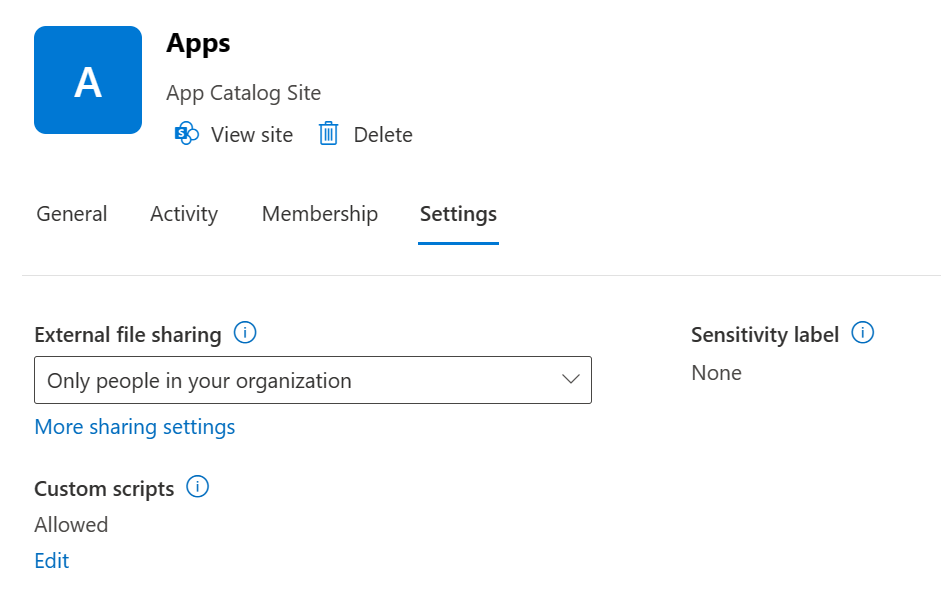
Today, when a site needs custom script temporarily, the standard move is to turn it on, do the work, and let it lapse. Changes revert to not allowed within 24 hours on their own:
# SharePoint Online Management Shell
Set-SPOSite <SiteURL> -DenyAddAndCustomizePages 0

# Or with PnP PowerShell
Set-PnPSite -Identity <SiteURL> -NoScriptSite $false
That 24 hour reset is usually described as the annoying part. It is actually the escape hatch, because it means the setting is changeable at all. Once the applicable phase takes effect, DenyAddAndCustomizePages is enforced as True and cannot be changed. The commands above will not fail politely with a warning about a 24 hour window. There will be no window.
If any of your documented procedures start with “first allow custom script on the site”, those procedures have an expiry date now.
Find your classic footprint
Before any of this becomes a project, find out whether you have a problem. Three sources, cheapest first.
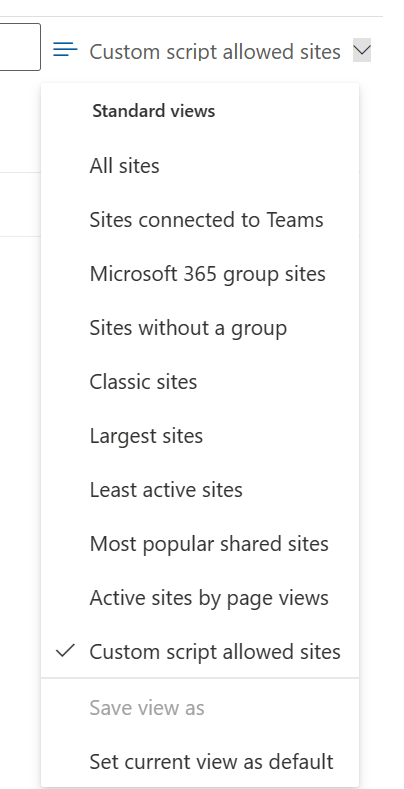
The admin center, which costs nothing. Under Sites, open Active sites and add the Custom script column to any view. Two standard views do most of the work for you: Classic sites and Custom script allowed sites. Note the wording carefully, because these views show sites configured to allow custom script, not sites actually using it.
Purview audit, for real usage. The SharePoint Classic Activities category carries three events: ClassicPageCreated, ClassicPageEdited and ClassicPageViewed. A page nobody has viewed in a year does not need modernizing, it needs archiving, and this is how you tell the difference.
The Microsoft 365 Assessment tool, for the full inventory. It discovers wiki, web part, publishing, blog, ASPX and Delve Blog pages, with web part inventory and layout analysis on the first three:
microsoft365-assessment.exe start --mode Classic --classicinclude Pages `
  --authmode application `
  --tenant <tenant>.sharepoint.com `
  --applicationid <application-id> `
  --certpath "My|CurrentUser|<certificate-thumbprint>"
Four switches change the cost of the run substantially. --auditlogwindowdays defaults to 14 and accepts up to 180, and fourteen days is far too short to judge whether a page is in use. --skipusageinformation drops audit collection entirely if you cannot get the permission. --homepageonly assesses only each web’s home page, which is a reasonable first pass across a large tenant. --exportwebpartproperties writes web part properties out as JSON when you need to see what a page is actually doing.
Not everything transforms
The assessment produces a MappingPercentage per page, and it is easy to read that number as a readiness score. It is not one.
| Page type | Detailed readiness | Route |
|---|---|---|
WikiPage | Yes | Batch transformation with PnP PowerShell |
WebPartPage | Yes | Batch transformation with PnP PowerShell |
PublishingPage | Yes | Cross site transformation, planned separately |
BlogPage | No | Separate PnP blog transformation, reviewed by hand |
ASPXPage | No | No automated route. Rebuild. |
DelveBlogPage | No | Legacy cmdlet only, outside the workflow |
Two things in that table will distort a plan if you miss them. Custom ASPX pages have no automated transformation route at all, so every one of them is a rebuild estimated by hand. And for blog, ASPX and Delve Blog pages, the readiness values are not a completed analysis, so a default or empty value means the analysis did not run, not that the page is clean.
There is a sharper version of the same trap. WebPartCount=0 with MappingPercentage=100 means no web parts were extracted. WebPartCount=0 with MappingPercentage=0 can mean enrichment failed for that page. One is a simple page, the other is a page you have not actually assessed, and a dashboard that averages them will go green for the wrong reason.
For complex pages, Microsoft points at the open source SharePoint Page Migration Agent, which is in preview, community supported, and carries no Microsoft support agreement. Useful for triage, not something to build a migration wave around.
What this does not do
- Nothing is deleted or modified. Affected pages stay available for viewing, permanently, in read-only form.
- Existing classic sites remain. Microsoft’s own guidance is that many classic sites can be modernized in place rather than rebuilt.
- Classic team sites can still be created. Only the ten publishing related templates are blocked.
- One migration path does close. From March 2027 a classic publishing site cannot be moved from SharePoint Server to a newly created classic publishing site in SharePoint Online, because the target can no longer be created. Pages can still be migrated, but they land read-only once the applicable phase hits, and script based elements may not survive the trip.
- Every cloud is included. GCC, GCC High, DoD, the air gapped environments and 21Vianet all get the page changes. There is no sovereign cloud exemption to wait for.
And if the assessment comes back empty, that is a real answer. Microsoft states it plainly: no classic publishing sites, no classic user created pages and no affected custom scripts means no action required.
Related reading
- How to Enable Saving Templates in SharePoint is built entirely on setting
DenyAddAndCustomizePagesto0. That is the technique that stops working, so read it as a countdown rather than a how to. - SharePoint Online Modern Script Editor and Its Consequences covers the consequences of script based customization, which is the argument underneath this whole change.
- Switching Between Classic and Modern Views in SharePoint is about list and library views, which are explicitly outside the scope here, and that distinction is easy to lose.
My own read is that the page deadline is the easy half of this. Pages going read-only is visible, dated and plannable, and most organizations have far fewer live classic pages than they fear. The scripting lockdown is the one I would start inventorying now, because it hits modern sites, it removes an escape hatch that a lot of internal documentation quietly depends on, and an SPFx web part disappearing from a live page produces no error anyone will report.
What I genuinely do not know yet is how many tenants are still leaning on the 24 hour allowance as routine practice rather than as an exception. If yours is, I would like to hear what it is being used for.
Javascript O365 PnP PowerShell Rest Endpoint Send an HTTP Request to SharePoint SharePoint SharePoint Modern SharePoint Online SPO